Skip to content

Prudai Developer APIEarly access Legal AI inside your own product, with citations that hold up.

Legislation and case law inside your own software, through two APIs. Every passage comes back with its location and, where the licence allows it, a checked verbatim quote. Prudai handles the sources, the checks and the security. Your team builds the product.

  • Search free at launch
  • Pay per request
  • Via API, CLI and MCP
How it works

StatusWe are building the APIs now. The Sources API comes first, the Chat API follows. With a Prudai account you can then create keys yourself.

Sources API: search with verified passages
curl https://api.prudai.com/v1/sources/search \
  -H "Authorization: Bearer $PRUDAI_API_KEY" \
  -H "Content-Type: application/json" \
  -d '{"query": "onverwijld ontslag op staande voet",
       "jurisdictions": ["NL"]}'

Response, excerpt of one hit

{"source_id": "rechtspraak",
 "document_id": "ECLI:NL:HR:…",
 "access": "full_text",
 "passages": [{
   "location": {"kind": "legal_consideration",
                "label": "r.o. …"},
   "quote": "…",
   "verified": true
 }]}
Example based on the planned contract.

How it works

Three steps from key to answer.

You arrange everything yourself, in your own Prudai account. No integration project up front.

  1. 1

    Create a key

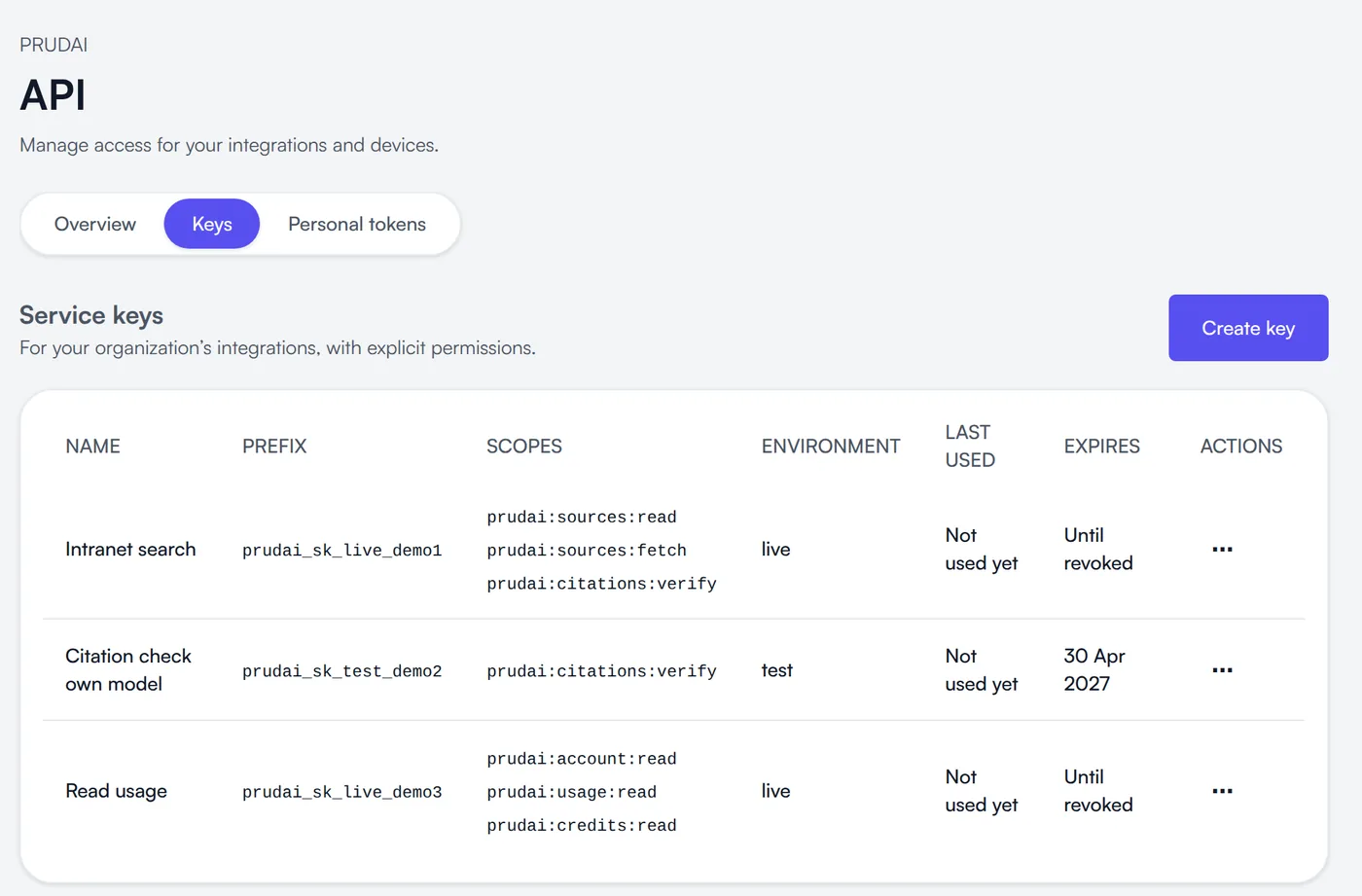
    On the API tab in account.prudai.com. For each key you choose the permissions, the environment and, if you like, an expiry date. You see the key itself once.

    The API tab in account.prudai.com, with three service keys and their permissions
    The API tab in account.prudai.com, in development. Shown with sample data.
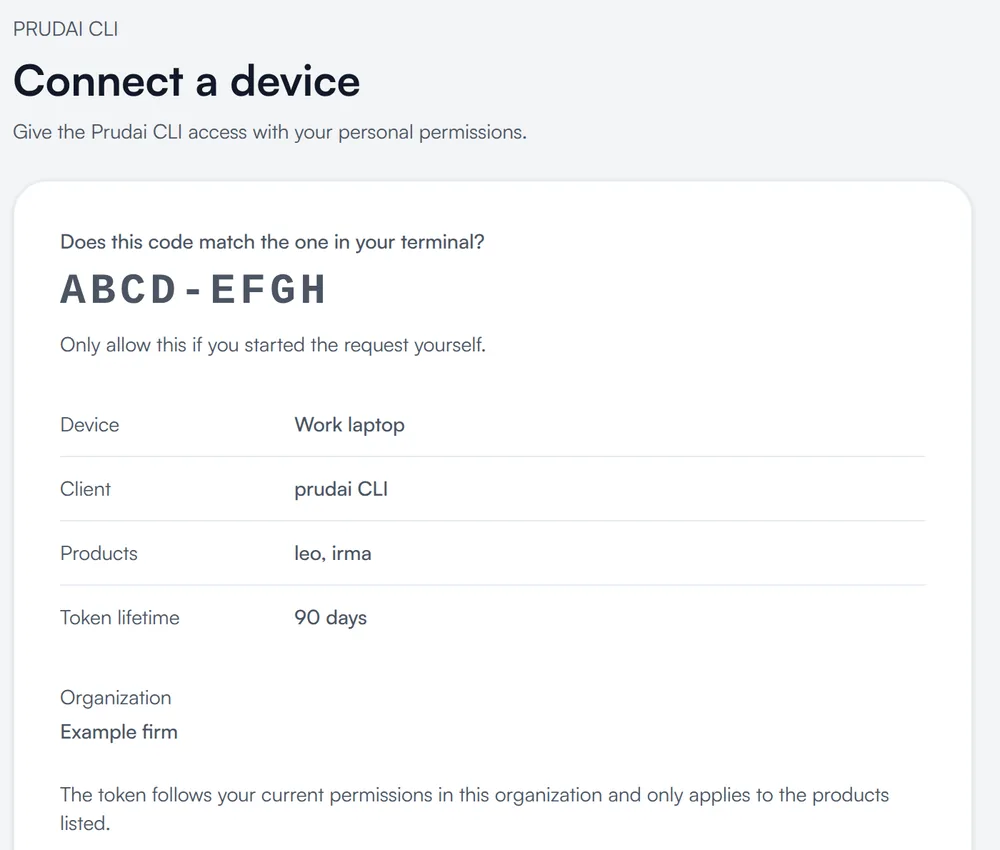
  2. The linking page in account.prudai.com, where you confirm the code from the prudai CLI
    Terminal
    $ prudai auth login
    Open account.prudai.com/koppelen
    and confirm this code: ABCD-EFGH
    
    Signed in to Example firm.
    The linking page for the prudai CLI, in development. Shown with sample data.
    2

    Call the API, or work with the CLI

    Your software talks to api.prudai.com/v1. In the terminal, prudai auth login links the CLI to your account: you confirm a code in the browser and the CLI works with your own permissions.

  3. 3

    See what each request costs

    Every answer states its cost in credits. You read balance and usage per organisation and per key through the API; an overview in your account follows.

    Sources API response, excerpt
    {"data": {
      "results": [ … ],
      "prudai": {
        "request_id": "req_…",
        "cost_credits": 0
      }
    }}
    Searching the sources costs 0 credits at launch. Example based on the planned contract.

Pay per use

You only pay for what you use.

1 credit = € 0.01

You buy credits in advance. A request costs what it actually used, nothing more.

  • Free at launch

    Search, fetch and citation check in the Sources API cost nothing at launch, within fair-use limits. If a fee is introduced later, we announce it in advance.

  • Pay per request

    Paid requests, such as the Chat API, are deducted from your balance. Every answer states what it cost, and you can read your balance and transactions through the API.

  • Control over spend

    One balance for both APIs. You set a monthly cap per organisation and per key. A request that is refused costs nothing.

StatusWe publish the price list per product and depth at launch.

Two APIs

The evidence from the source, or an answer with sources.

Both use the same citation check as LEO. The Sources API comes first.

Sources API

Coming soon

Legal evidence, without AI text in between.

For teams that write the answer themselves or use their own model. It starts with Dutch sources.

  • Search with verified passages. The exact passage, its location and, where the licence allows it, a verbatim quote.

  • Citation check. We confirm whether the source exists and whether the quote matches word for word, also for output from other models.

  • Full text where allowed. Only where the source’s licence allows it; otherwise a reference with its location. Also over MCP.

  • Short source answer. Later, as an option: a concise answer that only cites verified passages.

Chat API

Next

Talk to LEO and the other Prudai products.

You ask a question, Prudai does the research and answers with verified citations.

  • OpenAI-compatible. With the official OpenAI SDK: you change only base_url, key and model.

  • The product is the model. leo, a specialisation such as leo/arbeidsrecht, or leo-fiscaal.

  • Depth per question. From fast to thorough with reasoning_effort, and Ultra for the deepest research.

  • Verified citations. Source, location and the result of the citation check with every citation.

Chat API in Python, with the official OpenAI SDK
import os
from openai import OpenAI

client = OpenAI(
    base_url="https://api.prudai.com/v1",
    api_key=os.environ["PRUDAI_API_KEY"],
)

question = "When must a summary dismissal be given without delay?"

answer = client.chat.completions.create(
    model="leo/arbeidsrecht",
    reasoning_effort="medium",
    messages=[{"role": "user", "content": question}],
)

Coming soonAn open-source SDK for Python and TypeScript (Apache-2.0), for both APIs.

What you build

Legal AI, where your users already work.

  • Chat API

    A legal chat in your DMS or portal

    Answers with references to legislation and case law that your users open straight away.

  • Chat API

    Review in your own workflow

    Have a clause or passage checked against legislation and case law, as a step in a process you already run.

  • Sources API

    Source search in your own tool

    Show the passage itself, with its location and a verbatim quote, in your own search screen.

  • Sources API

    Citation checks in your own AI

    Already using another model? Have every citation checked before it reaches your user.

  • MCP

    Agents and assistants

    Let your own agent put legal sub-questions to Prudai, for example from a Copilot agent.

What you do not have to build

Sources and checks, already in place.

See the sources
  • Legal sources

    You do not have to connect or maintain sources. Prudai only passes on what the licence allows.

  • Checked citations

    Prudai checks whether the reference and the passage are in the source. Each citation carries the result.

  • Attribution

    You receive the attribution the source’s licence asks for.

  • Models that keep up

    Prudai chooses and maintains the language models. Your integration talks to leo, not to a model version.

Security and data

What happens to your data.

Exclusively within the EU

Customer data is processed and stored exclusively within the EU. It is stored in EU data centres of Hetzner, in Germany and Finland.

AI processing

Model calls run via EU endpoints of Google Vertex AI and Microsoft Azure OpenAI (Sweden Central). The providers contractually do not use prompts and output to train models.

Keys per organisation

A key only works for its own organisation, with explicit permissions, an optional IP list and a spend cap. Prudai stores only a hash: you see the key once.

Knowledge bases only on request

Your organisation’s knowledge bases are only reachable when an administrator enables them per key. Personal knowledge bases are never reachable through the API.

Processing & compliance

  • GDPR
  • ISO 27001
  • NEN 7510

Prudai is certified to ISO/IEC 27001:2022 and NEN 7510-1:2024

We set out the arrangements in the API terms and the data processing agreement.

Frequently asked questions.

When are the APIs available?

We are building them now. The Sources API comes first, with Dutch sources; the Chat API follows. With a Prudai account you can then create keys in account.prudai.com. Request early access and we will keep you informed.

What does it cost?

You only pay for what you use. Search, fetch and citation check in the Sources API are free at launch, with fair-use limits. For paid requests, such as the Chat API, you pay for what a request used, in credits: 1 credit is € 0.01. Every answer states its cost. We publish the price list per product and depth at launch.

Does my existing OpenAI code work?

Yes, the chat endpoints follow the OpenAI Chat Completions format. You set base_url to https://api.prudai.com/v1, use your Prudai key and choose a Prudai product as the model. Sending your own tools (function calling) is not supported: the research runs at Prudai. If you need your own tools, call Prudai as a step in your own agent.

Can I use the CLI instead of a key?

Yes. With prudai auth login you link the CLI to your account: you confirm a code in the browser and the CLI works with your own permissions. For servers and integrations you use a key with explicit permissions.

Can I search my organisation’s knowledge bases?

Yes, when an administrator enables them per key. Citations can then also point to your own documents. Personal knowledge bases and connections to customer systems are not available through the API.

What is the difference between the Chat API and the Sources API?

The Sources API gives you the evidence itself, without AI text in between: passages with their location and a verbatim quote, and a citation check. Later, a short source answer that only cites verified passages is added as an option. The Chat API gives you an answer from LEO, with verified citations. You get full text only where the source’s licence allows it; otherwise a reference with its location.

Where is the documentation?

The documentation will be at docs.prudai.com/api, with a quickstart, the contract and examples in Python and TypeScript. An open-source SDK for Python and TypeScript (Apache-2.0) is coming as well.

What do you want to build on Prudai?

Tell us what you want to build and in which system. We will contact you as soon as the API opens for your use case.

Request early access